Showing posts with label database design. Show all posts

Saturday, September 21, 2019

SDDM Physical Model for MySQL


As an example, I’ve imported the Relational Design for the HR schema into SDDM from my Oracle 11g XE Database. When you import from a data dictionary, SDDM creates a Relational Model, but it also creates a Physical Model for the database from which you imported. If you import from an unsupported database like MySQL, it will default to Oracle, but you can set the target to one of the other supported databases if you like. But I recommend that you choose from the Tools menu to run the RDBMS Site Editor, and create a new site for your MySQL database. By creating a new Site, you can distinguish your physical models that have been customized for your non-standard database.
This will require you to choose a supported database as the database type. So we have to choose the one that is as close as we can get. I did a lot of research and while there is no perfect solution, as far as I can determine, SQL Server was the best choice. There are some major differences that we will need to deal with, but at least the datatypes are fairly close, because they support the ANSI SQL standard a little better than Oracle. For instance, a text field is VARCHAR, not VARCHAR2. So here is my new RDBMS Site as shown in the Site Editor:


So, now I can create a new Physical Model for my MySQL database. The browser shows my Relational Model, the original Physical Model for my Oracle 11g XE database, and the new Physical Model.

DDL Differences for MySQL

What other adaptations do we need? For my purposes, the main change that I need is to change the DDL for generating surrogate primary keys from a non-repeating sequence of numbers. MySQL does this with the AUTO_INCREMENT attribute of the primary key column. So whenever I mark a column in the Relational Design as an auto-increment column, I want the CREATE TABLE command that is generated to have AUTO_INCREMENT, not the IDENTITY attribute that is typical of SQL Server and Oracle 12 and later, or the generated SEQUENCE and trigger that is typical of Oracle versions before 12c. And I want to use the “Start with” and “Increment” values that I put into the Relational Design, in case I don’t want to use the defaults – 1. Here’s EMPLOYEES.EMPLOYEE_ID marked as Auto Increment:


Table and column comment syntax is different too. In SQL Server, you have to call a built-in procedure to add the comment to the table or column. In Oracle, you use the “COMMENT ON” syntax. But in MySQL, there is a COMMENT attribute of the column or of the table. So I want “Comments in RDBMS” generated with the proper syntax.

Syntax for check constraint is pretty similar to syntax in Oracle or SQL Server, but they aren’t enforced in MySQL before version 8, so I want a SQL comment to warn the developer. There are a few CREATE TABLE clauses that are unique to MySQL, like ENGINE, but the defaults are reasonable, so I leave them out. If you need them, you may have to add some user-defined properties for them to SDDM and then the transformation script needs to use those properties in DDL generation – I may do that in a future version, but right now my script doesn’t have them.
In my next post, I’ll share my SDDM Transformation script, and explain how it works.

Friday, February 1, 2019

INFRA Database Design - Application Manager View


Finally, we get to the person who is supervising the overall application development effort. While this person has an interest in the other views, she/he has a particular interest in the work of the developers and the various versions or releases of the application system and its underlying application database(s).

Application System

This represents the product of the developers’ hard work, the actual application modules that show the screens that the users want and need to see. It includes both front-end modules that the users see, and the back-end modules that process the user input and prepare the user output. It can include the actual code behind those services that are being custom coded. It also includes code to talk to the various services whether custom written or not, and to the Application Databases.

Application Version

This may also be called an Application Release. It represents a frozen in time set of code for the modules in the Application System, often numbered according to local standards. For instance, release 1.0 might be the initial release of a system, while 1.2 is the second minor enhancement release. Application Versions are also often identified with a “tag” or “label” in the source control system. Task and Bug management software like JIRA often also have a place to record versions or releases. One goal of INFRA is to be able to coordinate its database with those of various Task Management and/or source control systems.

Application Database

This represents the various database structures and objects that contain and organize data used by one or more Application Systems. It may also include database procedural code like triggers. While an Application System can use objects in more than one Application Database and an Application Database can be used by more than one Application System, as a general rule, the relationship is one database to one application, especially for which application may update the database. Nonetheless, I have designed INFRA to be able to handle the less common many to many situation.

Database Version

This may also be called a Database Release. It represents a frozen in time set of objects in the Application Database, often numbered according to local standards. For instance, release 1.0 might be the initial release of a database, while 1.2 is the second minor enhancement release. It is usual to coordinate the database version numbers with the application version numbers – so that version 2.5 of the application goes with version 2.5 of its database. Even if you don’t do this, it is very important to make sure which version of the application matches which version of the database. Database Versions are also often identified with a “tag” or “label” in the source control system.

Entity Relationship Diagram for Application Manager View


This concludes my series on the database design for INFRA.  I am very interested in what you think of INFRA so far.  What did I get right?  What did I get wrong?  Where would you go from here?  Next time, I'll talk about implementation options.

Wednesday, January 30, 2019

INFRA Database Design - Deployment Manager View


The Deployment Manger role is probably the hardest one to describe, and has the most complicated database design of any part of INFRA. For one of the teams that I have worked with, it was an additional duty for our System Administrator, and the DBA (me) did the database portion of deployments. In fact this is a fairly common arrangement, with one team to deploy the application and another to deploy application database changes. As I said before, you may not have a person with this title, but you certainly have people doing the job.

I have seen bad things happen when Application System deployment and Application Database deployment are not coordinated carefully. These are two parts of the development effort that are often done separately, yet are very dependent on each other. If an application requires storage and retrieval of a new data item, and the database does not yet have the table column to contain this data, the application will start throwing errors. If a database has been changed to require uniqueness for an item, and the application tries to insert duplicate data, the application will start throwing errors.

Another aspect of this role is the DevOps movement, which tries to automate deployments and do regular frequent releases. Here, the Deployment Manager will control and configure continuous integration software like Jenkins. The Application Manager and Database Administrator need to make sure that source control software clearly contains tags to denote which versions of which source code goes with which release. As a Database Architect, I’ve found the database side of this to be particularly sensitive, and because it is often outside of the Deployment Manager’s area of expertise, I will often assist in configuring for database deployments. See my earlier post on Database Source Control and Deployment for more of my thoughts on the subject.

Services

I’ve already touched on Services from the System Administrator’s point of view. From the Deployment Manager’s point of view, Services are the targets of Application System deployments. So we are deploying a particular release or version of an Application System and/or Application Database to a service running on a particular server. A service might be a host for an application system, such as Tomcat, JBoss, or Glassfish, or the application or some service used by an application could be running as a stand-alone service, as in microservices. It might be running under some operating environment, like NodeJS or in a JVM. Or it might be a service that is already running such as an LDAP Directory, with no new deployment needed, except to make sure that configuration files for other parts of the system reference the correct service.

Environments

I haven’t touched much on List of Value (LOV) entities, as they are mostly lookup tables of possible values for attributes in other entities. But Environment is a bit special, and especially important to the Deployment Manager. It is also special for Developers, Testers, and Users. On our teams, we have generally had four or five environments:

Development is for the Developers and Deployment Managers don’t always get involved in deployment to this environment because developers do their own deployment after unit testing. It is okay for things in this environment to be unstable, and to have bugs. We hope to find and fix the bugs here before they go to the other environments. Sometimes, each developer has his/her own development environment, then deployment is done to a shared environment.

Test is for more formal testing. This is also a good place to debug deployment itself, to make sure deployment tools are configured properly. Deployment to Test is less frequent than to Development, but more frequent than later environments. Testers would like a fairly stable test environment because they want bugs they find to be repeatable, so they can clearly identify the version where the bug was found, and the steps needed to reproduce the unwanted behaviour.

Pre-Production and/or User Acceptance Test (UAT) are the final stages before a release goes to Production. In some shops, a different team does production releases than the team that does development and test releases. So pre-production may be where the production team makes sure that the development team has given them everything they need for deployment, and where they can review for standards compliance and security. UAT is where users can get their first look at the application system, and make sure that it meets their needs before it goes to production.

Production is of course where all development teams want their hard work to end up. Sadly, I’ve seen a few application systems that never made it to this environment.

Application Deployment and Database Deployment

These are two separate entities, but very similar. Each is a deployment of a particular version or release of a particular application system or application database to a particular set of services (and of course running on a particular set of servers). You’ll see many to many relationships all over this – since you can have several releases running in different places at the same time. For instance, developers working on release 1.2, while testers are still testing 1.1. An application might be monolithic deployed in one piece to one application server, or consist of several pieces. And there is a relationship of concern to me personally, where a version of the application system is tied to the version of the application database that it expects.

Entity Relationship Diagram for Deployment Manager View


Friday, January 25, 2019

INFRA Database Design – System Administrator View


I’ve only been an assistant System Administrator, but I know what SAs want to see. They want to see the servers, their network addresses and what is running on each one.

Servers

There are two kinds of servers, physical servers and virtual servers. Physical servers are actual computers, pieces of hardware. Thus, we include attributes for the characteristics of the hardware like manufacturer, model number, and serial number. We also include the location of the hardware.  They will either run operating systems that will directly host services, or operating systems like IBM’s venerable VM/CP (I mention this, because I once used it) or VMWare that host virtual machines. Sometimes an operating system that can run services will also run a virtual machine host as a service, like Oracle’s VirtualBox or Microsoft’s Windows Virtual PC. We also use servers that are hosted in the cloud, like AWS or Oracle’s platform as a service. I would not include containers such as Docker or Kubernetes as servers, though there are some parallels. I have a self referencing relationship to show that some servers host other servers. Please note the importance of distinguishing the physical servers from the virtual ones. We often want to know that certain servers are on separate physical machines. For instance, as a DBA, I want to be sure that if the physical device hosting my database fails, the backup data needed to recover it is on another device that survived the crash.

Aliases

Servers have name, but a server may have several names. In fact, even when I list an IP address for a server, it is the primary IP address only. You see, network gateways may in fact have an internal address for a server and an outside address. As far as names go, a Web Server may be configured to show a home page for one application when accessed by one name and for a different one when accessed by another name. The user may never know that they are really the same server.

Services

A Service is a sort of nebulous concept – it can mean all kinds of running software that provide things an application system needs. A Database Instance, which was already explained, is just one specific type of service. Others might include LDAP Directories like OpenLDAP, that provide identity services, Web Servers like Apache that show and get resources using the HTTP protocol, or Application Servers like Glassfish which do similar work but tend to have additional capabilities more suited to running application systems. There are also services that your application system might use that are not operated by your organization, like Bing Maps or Yahoo Finance. I included Application Service as a target for application system deployments for the Deployment Manager view but the two specific types of services in my design are NOT the only types available. This is where I’d put references to Docker or Kubernetes containers – which are useful ways of hosting your services.

Access Ports

One thing that services often do is open certain access ports on your server. SAs want to know which ports are open as each open port is a security concern. And of course others on the development and maintenance teams need to know how to access the services that their tools and application systems are using. Each port is associated with a particular service on a particular server and two services cannot use the same port on the same server. Therefore if Apache Web Server is using ports 80 and 443 on dev.mycompany.com, and Glassfish is also running on that server, Glassfish must use some other ports, like 8080 and 4443.

The full address of a service will include an alias or IP address, a port number, and maybe a resource name as well. Usually, an access port will also be associated with a particular standard protocol used to access the service. Protocols include those such as HTTP and HTTPS for unencrypted and encrypted web services, LDAP for accessing directories, or SMTP for mail servers. There are some protocols that are proprietary as well, such as SQL*Net for Oracle RDBMS. Some ports are standard for certain protocols, such as 80 for HTTP, while others are customary but not required.

Entity Relationship Diagram for System Administrator View


Friday, January 18, 2019

INFRA Database Design - DBA View


What does the DBA want to see? The DBA wants to see the databases, of course.

Database

So the Database Entity is going to be a central player in the part of the INFRA database that supports DBAs. What is a Database? It is a means of storing, retrieving, and organizing the data that is behind an application system. In short, it is your major tool to save the data and change data into information, A Database is managed by a Database Instance which is a special case of a Service – we’ll talk about Services when we look at some of the other views. In an earlier blog post I talked about databases and database instances in more detail. For our purposes here, a Database Instance is the executing software that manages the files that contain your Database. An instance is an instance of a particular vendor’s or source of database software such as Oracle, SQL Server, Cassandra, or whatever, and one of its attributes will be which version of this software is running.

Application Database

Where the Database entity represents a general term, the more specific meaning of the word, database, is the database objects that are created to store and retrieve the data for a particular application system. To distinguish the two, I have chosen to call this the Application Database. For instance, an HR application might have database objects for information about Employees and Departments, while an Order/Entry application might have objects for Customers, Orders and the Order Line Items in those orders. These objects might be stored in any kind of a database as decided by the developers of that application system. Notice that an Application Database can store data for more than one Application System and an Application System can use data in more than one Application Database. This is in recognition that some data is shared between application systems, though usually only one system may maintain the data while others only read it.

Database Version

My Database Version entity is really an Application Database Version – I just left off the word, “application”, for brevity. The version supports the fact that Application Databases change over time, just as the applications that use them do. So a Database is the target of a deployment of one and only one Application Database Version, but can contain versions of more than one Application Databases. As a general rule, it will contain only one version of any single Application Database. Not shown on the diagram below is the relationship between Application System Versions and Database Versions. Usually a version of an application system is developed side by side with a version of its database, so the Deployment Manager needs to know which two versions correspond. You’ll see this when we get to that view.

Entity Relationship Diagram for DBA’s View


Friday, June 29, 2018

Oracle SQL Developer Data Modeler and Microsoft SQL Server

Even though my target database in my new job is Microsoft SQL Server rather than Oracle RDBMS, I still use an Oracle tool for a key part of my work - data modeling.  My tool of preference is Oracle SQL Developer Data Modeler (SDDM).  While there are other data modeling tools out there, and some (ERWin and TOAD Data Modeler are two I've used) are very good, I prefer SDDM.
  • It is free to use. (Thank you, Oracle!)
  • I haven't been allowed administrative authority on my government issued laptop, so I can't install software.  But to install SDDM, you just unzip - which I CAN do.
  • It can reverse engineer from SQL Server - all you have to do is point it at a SQL Server JDBC driver.
  • It supports DDL generation for databases other than Oracle RDBMS - including SQL Server.
  • It understands the difference between Logical, Relational, and Physical Modeling.  Some tools just model databases (relational) - tables, columns, foreign keys.  They call it Entity/Relationship diagramming (logical) but it isn't really.
  • Whatever SDDM can't do, you can probably script - more on this in a later post.
  • There is good information and support available even if you don't have a contract with Oracle Support.  Some resources:
    • Jeff Smith - Oracle's Product manager for the tool.
    • Heli from Finland - Author of an excellent book about SDDM.
    • Dave Schleis - expert on SDDM scripting, especially with Groovy
    • Kent Graziano - especially good at using SDDM to design Data Warehouses.
    • SDDM Forum - The people listed above, other users and even SDDM's developers, especially Phillip Stoyanov answer your questions.

Using SDDM with SQL Server

So, as I said, SDDM works perfectly well with a SQL Server database. All you need to do is register a JDBC driver for it.  While Microsoft does have a JDBC driver that you can download, and it does work with SDDM's stand-alone version, SDDM also comes bundled with Oracle SQL Developer and that DOESN'T work with Microsoft's driver.  Neither does Eclipse, which I'm currently using as my primary IDE.  So instead, I'm using the free open source jTDS JDBC driver for SQL Server and Sybase (Sybase is a close cousin to SQL Server).  You can get jTDS here: http://jtds.sourceforge.net/.  Just download and unzip.  Now open SDDM and select Tools/Preferences and find "Third Party JDBC Drivers":
Or the steps are similar if you are using SDDM embedded in SQL Developer.  Now when you configure a connection to a database, you will have an additional tab for a connection type of SQL Server:
Fill in the blanks, and off you go: you can now import from the SQL Server Database Dictionary to reverse engineer your database into a Relational Design.  Or if you are using SDDM embedded in SQL Developer, you can open a connection to your SQL Server database in SQL Developer, and do many of the normal SQL Developer tasks.  Just one warning - SQL Developer doesn't really understand T-SQL, Microsoft's counterpart to both SQL*Plus style scripting and PL/SQL.  So there are limitations to what you can do in the SQL Worksheet.  But one thing you CAN do is open a relational diagram in SDDM and drag objects onto it from the SQL Server connection in SQL Developer.

Reporting

SDDM has a pretty good reporting capability and I'm only beginning to learn its full capabilities.  But if you want to write SQL queries or reports against your data model, you will want to export your model to a Reporting Repository.  The Reporting Repository needs to be in an Oracle database - sorry.  This is why I asked my system administrator to set up a server with an Oracle Express Edition (Oracle XE) database, just for my private use for SDDM reports.  Like SDDM, Oracle XE is free to use, and while limited, it has no trouble hosting an SDDM reporting repository.

SQL Server DDL

You can also create a Physical Database design for SQL Server and SDDM will create DDL appropriate for your database - it understands the differences.  Only problem I've had with it, is that I usually need to manually edit the output a bit.  The worst problem is that the "GO" command needs to appear on a separate line and sometimes the newline is missing.  Also, SDDM tends to output UNIX/Linux style newlines, not the standard carriage return/linefeeds expected by Windows.  There is a little bit of a problem between the Schema in Relational Design and its implementation in Physical design - Physical doesn't always pick up the mapping you specified. But this may be something I'm doing wrong.

So - if Oracle isn't a dirty word for you SQL Server database architects, you may want to check out Oracle SQL Developer Data Modeler.  It is a great, cost-free way to design your data model.  I plan to write another post soon to talk about some SDDM scripting in Dave Schleis's favorite language: Groovy.

Monday, June 4, 2018

Databases vs. Instances

As a long-time Oracle developer and administrator, one of the most interesting differences that I've found as a newbie SQL Server developer and administrator is in the simple basic term, database. 

In simple terms, a database is a set of database files in permanent storage that share a data dictionary, logs and control files.  An instance is a set of running processes that maintain a database and its control files and logs.  While there are in-memory databases where the database is in the server's memory, rather than maintained in permanent storage while its associated instance is running, eventually even this kind of database does get written to permanent storage.

Until Oracle 12c with its multi-tenant option, a database and an instance in Oracle were pretty close to the same thing.  With Oracle Real Application Clusters (RAC), you might have several instances on separate servers accessing a single database, but you would not have several databases under the same instance.  It would not be unusual to run several Oracle databases on the same server, but each database would be maintained by its own instance (or instances in the case of RAC).  Instances might share a network listener for client connections, but the client would indicate the instance to which it wanted to connect, and therefore which database.

But in SQL Server, and a few other relational databases, for example, PostgreSQL, a single instance can run several databases.  There are also some required databases managed by an instance, such as the database that contains the shared data dictionary.  Each database can have its own schemas, users, tables and other database objects.  None of these need to be unique except within a database.  A full unique name for a database object would be databaseName.schemaName.objectName.

This came in handy recently when I needed to create a new test database identical to our existing development database with three separate schemas.  My Oracle-trained brain initially was thinking that I needed a new SQL Server instance, since I didn't have an extra server or database license.  This is possible, but not very common, and it requires the original SQL Server installation media.  But I was reminded that I could just create a new database in the existing instance.  It could have the same schemas and database objects, but a different database name.  And it was just as easy to configure the test version of the application to connect to a different database in the same instance as to a database with the same name in a different instance.

I had two choices available for creating my test database.  It is very easy to use SQL Server Management Studio to back up my development database, and then restore it into a new test database.  But that would also copy the development data instead of creating the tables empty.  Instead, this proved to be a good opportunity to test my DDL scripts.  I have one script for each object to be created, and a master script to call each in the correct order.  This also executes scripts that load data into reference and lookup tables - remember that I consider data for these tables to be part of the source code for the database.

So, chalk this one up as an advantage for SQL Server.  Multi-tenant Option in Oracle 12c (and its successor, Oracle 18) has similar advantages - and may even be a little better if you need to move tenant databases around.  But it is an extra cost option, while multiple databases is a standard part of SQL Server.

Friday, March 10, 2017

Reading Entity-Relationship Diagrams to Users

Earlier this week, I attended a meeting of the National Capital Oracle Users Group (NATCAP-OUG) at which I saw a presentation about validating your database design.  It got me to thinking about database design, why we should do it, and how to use it to improve applications.  And it all starts with an Entity-Relationship Diagram (ERD).

ERD

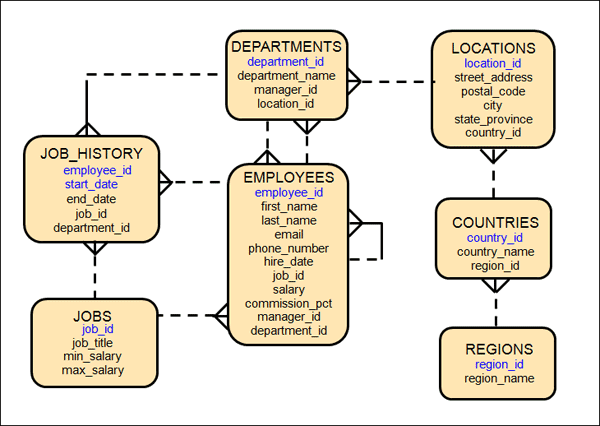
So, here's an ERD for the Oracle HR sample schema:http://www.oracle.com/webfolder/technetwork/tutorials/obe/db/12c/r1/odb_quickstart/images/t10101.gif
I do an ERD very early in the requirements definition phase of an application, and I refine it throughout the process.  Why?  Because this can help you discover things about your subject area and use cases that you don't get any other way.  After all, the application is designed to help your business collect information about the things they do, and to use that information to inform and govern what they do next.  Without data, your application is just a game.  Not that I have a problem with games.  And even games need to collect information about score, progress, items the player's avatar is carrying, etc.

Unfortunately, a very important part of an ERD is missing from this one - the names of the relationships.  Relationship names help you to read and understand your diagram, and particularly to read the diagram to your users.  What?  You don't read your ERDs to your users?  You SHOULD, if just because your users shouldn't be expected to read and understand the diagram for themselves.  So the rest of this post is to explain why and how to read an ERD to your users.  A lot of what I'm going to say is not original with me.  I read an article a long time ago called "Why we say Each" which has guided my database designs ever since.  Unfortunately, I have somehow lost my copy of the article, and have forgotten who wrote it.  So to the author of this article - thank you.

Reading the ERD

I'll start at the very top with the Departments entity:
  • Each Department may be staffed by one or more Employees.
  • Each Employee may work for one and only one Department.
"staffed by" and "work for" are two of the missing relationship names.   Notice that I have a name for both sides of the relationship.  This is important, because it will help us discover when we have a relationship wrong.  The word, "may" is also important because it indicates that the relationship is optional.  The use of "may" in the above two statements means that it is possible to have a Department that has no Employees, and it is possible to have an Employee who is not part of the staff of any Department.

Here you may begin to see why it is useful to read the ERD to your future application users.  I would use this as an opportunity to ask them, "Is this correct - is it true that you can have a Department with no Employees?  Is it possible to have an Employee who doesn't work for a Department?"  Finally, there are the words, "one or more" and "one and only one".  Once again, I can ask the users, "Can an Employee work for more than one Department at the same time?"  Let's continue:
  • Each Department must be managed by one and only one Employee.
  • Each Employee may be the manager of one or more Departments.
Once again, I have added "managed by" and "manager of" as relationship names and I name each side of the relationship.  I've arbitrarily decided that it is mandatory that there be a Department Manager, but I need to check this with my users.  By the way, by making this a mandatory relationship, I seem to have decided that a Department must have at least one Employee, but notice that the manager of a Department does NOT need to "work for" that Department.  In fact, since an Employee may manage one or more Departments, we can't force the manager to "work for" each Department he/she manages, UNLESS we change the relationship so that Employees may work for one or more Departments.  Finally, we'll look at the self-referencing relationship in the Employee entity:
  • Each Employee may manage one or more other Employees.
  • Each Employee may be managed by one and only one other Employee.
These relationships are fairly straight forward, except we may want to ask the users if every Employee MUST have a manager.  That would be possible, EXCEPT that there is probably at least one Employee, the President, who has no manager.  Exceptions to the rules are possible, but we need to know about them and clearly define them.  Also, see that I have added a rule in these relationship statements, the word "other".  This is to make clear that an Employee may not manage her/himself.  Or maybe that is the solution to the problem about the company President - he manages himself.  By the way, did you notice that manager_id in the Employee entity and manager_id in the Department entity are not really the same thing, even though they probably will contain employee_ids as a foreign key?  We may want to give these attributes different names.

Further Study

See what you can do with reading the rest of the diagram.  Hope this has convinced you that database design is an important part of requirements definition, and that you need to read your ERDs to your users.